Saturday, January 10, 2009

Affiliate Marketing for your Business?

What is Affiliate marketing? According to Wikipedia, Affiliate marketing is an Internet-based marketing practice in which a business rewards one or more affiliates for each visitor or customer brought about by the affiliate's marketing efforts.

Affiliate marketing gives your business access to a vast network of sites to promote your products. This vast network drives traffic to your website. Most of the time, it is done through an affiliate management company. These companies already have hundreds of thousands of publishers in their network, you just need to offer these publishers a lucrative commission to attract them to promote your products. You can also increase your commission at different sales tier to encourage publishers to work harder to push your products.

You usually offer your affiliate network discount coupons or special offers for them to promote to their visitors. These offers should be updated in a timely manner to keep the offer fresh and make the visitors come back regularly for your offers.

In my opinion, customers acquired through affiliate marketing are either bargain seeker or people looking for extra value for their purchase (i.e. point collector). Some of your affiliates might offer points/ cash back to their members. For point collectors, most of the time they don’t mind buying a higher priced item, since they can get more points/ cash back out of their purchase. For bargain seeker, they searched through the web for discount coupons before making their purchase. With affiliate marketing, on top of other marketing methods, you can acquire different type of customer, not to miss out any one of them.

Affiliate marketing is a great way to increase your products’ exposure. Of course there is a cost associated with affiliate marketing. Besides paying the commission own to the performing publishers, you would also need to pay your affiliate management company a management fee. The fee differs from one management company to another. Check out the affiliate management companies below and see if there is a program right for your business. (of course there are more than 5, search on the web for more)

1) Commission Junction
2) Linkshare
3) CX Digital Affiliate Network
4) Hydra Network
5) Panthera Network

If you are a publisher, you can join one of these networks and post ads on your website. You can make money when someone referred by your site made a purchase. However, some vendors do not approve all sites but only quality site they think are relevant. Make sure your site is functioning well before applying to be one of their affiliates.

Sunday, May 18, 2008

Create a Blog for your Business?

Should you create a blog for your business?


There are different Pros and Cons. Personally I like the idea of creating a blog for a business. However, at the business level, there might be some concerns for different businesses.


You have a website, why do you need a blog?


For me, website is a place for you to provide one way information to your visitors. Whereas in a blog, people can interact with your posting and visitors can discuss among themselves or with you, all topics are archive in chronological order/ category. Anyone who is interested in a certain topic can read all related postings. The communication is both ways, visitor tells you what they think and you explain to them and others who read the postings. The best thing is, customer get to communicate with insider of the company. In some case can be CEO, Marketing Manager, Sales Manager or Service Manager etc. In some case it can be the master blogger. Anyhow, it is still another channel for the management to know about what is going on in the field.

Moreover, you can create reciprocal linkages between your website and your blog. The rich and extra content in your blog will get itself a high page rank. This in turns will bring more traffic to your website. The reciprocal linkages in both sites (your website and your blog) might help themselves to improve their Search engine page rank.


What if your customer asks you some question you don’t know how to answer?


This is many businesses’ concern and that’s why many of them are reluctant to have a blog. If a business chooses not to answer, it will seem to be irresponsive and won’t get the company any good images. If a business chooses to answer, which it should, it needs to answer very skillfully, need to satisfy the customer and still not disclosing anything it doesn’t want to tell or get away with something it doesn’t know how to answer. Moreover, the customer will respond back in your blog. I think the business needs to have a very good Public Relation (PR) team to do that.


Uncontrolled postings…


This is another concern of many businesses. Some bloggers just keep on posting, maybe even on some irrelevant topics. Anyhow, this one is easy, the blog administrator can just delete the irrelevant posts. Some bloggers just keep on confronting the business. It can be a tougher situation. You cannot just delete or block a blogger. If you do that, and some mad blogger might bad mouth your company. Your PR team should get you a good tactic based on the situation.

I guess based on the priority of your company, you can decide whether you should get your company a blog. If your first priority is to get a channel for the management to have interaction with the customers, and confrontation is not a concern (you know how to handle it), a blog might be good for your company. When you do have your blog, make sure your master bloggers are responsive to the postings there. Otherwise you have defeated your purpose of having a blog and this will also gain your company a bad image.

Sunday, May 04, 2008

Buying Multiple Domains to Improve Site Traffic?

Many people might ask, will buying more domain names improve your site traffic? Should we use buying domain names as one of the internet marketing strategy to increase web traffic? It really depends. However, frankly, in most cases it doesn’t.


It will help a bit if you use the domain with keywords as your main address but not as a forward. For example, you own an online store with the site address “junepharmacy.com”, and you buy the domain name “onlinedrugstore.com” and have it forward to junepharmacy.com. The new purchased domain will not help generating traffic for junepharmacy.com unless there is a famous drug store called “onlinedrugstore.com” and its customer mistyped it as “onlinedrugstore.ca” (Some people does purchase typos of popular sites and in many cases this does help to increase their site traffic).


However, if you use the domain “onlinedrugstore.ca” as your main site address, it might help generating more traffic to your website. It helps as there are keywords in the domain name. When people types in “Online drug store” in Google, Yahoo, MSN or other search engines, your site will be very relevant and will show up in the Search Engine Result Page (SERP) enjoying a good page rank.


So you might only need to buy one premium domain for internet marketing purpose. Select your domain very carefully and don’t waste your money buying multiple domains if not necessary. If you need to use your company name as the domain, name all your other pages with keywords, this will surely help (e.g. www.junepharmacy.com/onlinedrugstore.html).

Monday, April 28, 2008

SEO Tip - Prevent New Site/URL to Hurt your Page Rank

Many internet marketers have the same doubt at some point. Should they revamp their website? They want to improve their sites with new technology, new look and feel. However, would the new improved site, the new URLs/ new domain hurt the good page rank the current website is enjoying?


It could if you don’t do what is necessary to correct the possible damage. However, it is an easy fix. All you have to do is, from the old URLs, make redirection towards the new URLs to specify that the page has permanently changed its address (301 redirect or called permanent redirection). Then the search engine will stop indexing the old URLs and update its index by assigning the new URL to the page.


If you don’t do the 301 redirect, your new site will be lost in the search engine index, people will have no way to get to your new site. The 301 redirection is very important as we don't want the search engine to index the old non working page and at the same time we won't lose the position (page rank) and index the old page has gained throughout the year.

Saturday, April 26, 2008

SEO Tip - Maintain & Improve your Google Page Rank by Updating Your Site Content

You have put together a great site and achieved a high rank in Google. However, don’t ever think you can then relax and still can keep your high page rank in Google. The job of search engine optimization (SEO) never ends. Your page rank will drop if your site do not have fresh content or do not have regular updates. I do not know Google’s page rank algorithm. However, when I see a drop in my page rank, I can gain some page rank back by adding new content in my website.

Of course, the best thing is to create a new content page. If not, at least slight changes in the existing pages. You will see the positive effect on page rank a few days after new content is added. (at least from my experience)


Don’t think you can stop working as soon as you have built a good site, it is a long and continuous effort to keep your site in good ranking. If you do not have new content, your page rank will continue to drop. However, when you think about it, Google’s algorithm enables it to return the best and most update results for any particular search.

Thursday, April 24, 2008

Effective Email Marketing - Tips to succeed in E-mail Marketing Campaigns

Few tricks in Email Marketing can help to boost your E-mail Marketing campaigns. Pay attention to the following 4 elements (in no particular order) in your E-Blast can increase your Click Through Rate (CTR) and effectiveness of your Email Marketing campaigns.


1) From Address (Email Sender Address)
2) E-mail Subject Line
3) Content
4) Day and time of delivery


1) From Address (E-mail Sender Address)


- If you see an email from an unknown or spam like sender (weird characters), of course you are not going to open it but just to trash it. However, if it is from an well known organization, an organization known to the recipient or a real person name, recipients are more likely to open the E-mail.


2) Email Subject Line


- The Email Subject Line has to be relevant to the recipient and answer the needs (e.g. attractive offer for a consumer or "Tips to rank high in Google" for an internet marketer) or fix an issue for the recipient (e.g. Help you lose 10 lbs in 10 days). It should clearly describe the topic of the email. Sometimes, mention an authoritative body in the Subject Line will help the Click Through Rate. For example, recipient in US pharmaceutical sector will be alert to read something with subject line “FDA approves…”; a mailing solution company in UK will alert mail solution user by addressing it to “Important news for Royal Mail users”.


3) Content


- Content has to be short and to the point. It has to be easy to read as people usually only scan through their email to spot if there is anything that interested them. Do not disclose all the important information but just enough to attract people to click the link and go to your website to read more.

Moreover, content has to be relevant to the recipient. For example, you won’t send information about dogs to cat owners.

Last but not least, use some relevant graphics to make the content more interesting. When I said relevant graphics, don’t put picture about dogs when you are talking about cats. Since you don’t have a lot of space to put a lot of pictures, only put the one which are eye catching, relevant and interesting, the ones that can grab attention and raise recipient's interest in the articles.


4) Day and time of delivery – Best day and time to send your Email Marketing Campaigns


Best Day to send:


Tuesday to Thursday mornings are usually the best days to send your email campaigns. You will usually get the optimum response from an email campaign sent on Wednesday. Monday and Friday would usually get the worst response rate. Imagine on Mondays, everyone has a whole bunch of email sitting in their inbox waiting for them to check. People will usually skip yours, which are the non work related ones. Same for Fridays, people just want to finish the urgent work need to be done that day and wait for the weekend to come. They won’t bother checking your marketing email if it is sent on Fridays. When accumulating with the email sent on Saturday and Sunday, your Friday email will be at the bottom of the unopen pile and will most likely to be skipped when you are back to work on Monday. Don’t send your email campaign during a business holiday or weekend. Business people are not there to read them and accumulated Ad mail will only be deleted.


Best time to send:


If you have an international list, segment it by time zone will help you increase your response rate by being able to deliver your email campaign at the best time.


Generally 10:00-10:30 a.m. and 1:00-1:30 p.m. are the best time to send. At 10, people have usually checked all email or cleaned up all “spam” accumulated during the previous night. They have already warmed up a bit for the day (they might want a small break at that time). At 1, they just finished lunch and they are more relaxed before getting back into their work.


If the above is not enough for you, there is also a very systematic formula available online. Click here to go to the Email Labs website for more details.


Time of the year:


For seasonal goods, this is very important. You won’t promote the wrong thing at the wrong time. Moreover, don’t send a campaign right before and right after a holiday. Or your email will most likely be skipped.

Wednesday, January 02, 2008

Netscape is exiting the Web Browser scene: No more support for the Browser from Feb 1 2008

Announced in the Netscape blog on December 28, 2007, there will be no more security patches for the current version of the browser, Netscape Navigator from February 1, 2008. Netscape.com will still continue to serve as a general use Internet portal. After February 1 2008, Netscape users have to go to the UFAQ, the Netscape Archive, the Netscape Community Forum for information about Netscape. Tom Drapeau, the director of AOL's Netscape brand encouraged Netscape users to adopt Firefox. This signifies the end of Netscape's era.

I used Netscape more than 10 years ago, when I first started exploring the internet. Netscape has dominated the web browser market at that time. Back then I was using Alta Vista as my search engine. Today, I no longer use Netscape but Firefox and I have long been using Google instead of anything else as my search engine.

The market is very practical, if a company don't innovate and continuously provide the best product, it will be replaced by newer, better and innovative companies in no time. Netscape used to have more than 80% market share in 1995. Now, according to the study done by the web metrics company Net Application in Dec 2007, Netscape's browser share at just 0.60 %, while Microsoft Internet Explorer dominated with a 77.4 % share and Firefox accounted for 16 %.

When I look at the browser my blog's visitors used, a pathetic 0% of them use Netscape. In the table below, you can see the % is skewed to favor Firefox. It is not surprising as techies tend to use Firefox more. I would think my visitors, people who are interested in internet marketing are more tech savvy than the general internet public.


When we look at the browser usage for a consumer product blog, you can see the difference. We have a majority 60.33% using Microsoft Internet Explorer while only 34.71% is using Firefox. Sadly for Netscape, still 0% share.


From the two blog browser usages shown, we still see Firefox has a skewed % instead of the lower 16% Firefox market share. These results are skewed as blog readers tends to be more tech savvy than the general internet users. Firefox has a bigger popularity within the tech savvy population.

Anyhow, all Netscape users should quickly adopt Firefox (or other web browser) as support will cease from Feb 1 2008.

Wednesday, December 19, 2007

Tested List of Blog Directories: Increase Your Blog Traffic, Submit Your Blog to June's List of over 60 Free Blog Directories

Submit Your Blog (and RSS Feed) to June's List of more than 60 Free Blog /RSS directories below and gain traffic by:
1) Reciprocal linkages (Helps improve your search engine ranking)
2) Additional entries in different search engines
3) Traffic from different Blog Directories

The Most Comprehensive List of Tried and Tested Free Blog Directories:
(The hyperlinks are to the sites' main pages since some of the sites change their "Add a Blog" page periodically)

I.Top 16 Free Blog /RSS Directories: (Get you Extra Entries in different Search Engines)


Color coded: Green=Google; Red= Yahoo; Blue=MSN; Yellow=AltaVista; Purple=All the Web

1) 2-review.com Give your blog extra entries in Google, All the Web, Yahoo and AltaVista.
2) BlogCatalog Give your blog an extra entry in Google.
3) Bloggernity Give your blog an extra entry in Google and Yahoo.
4) Digg A news, video and image directory: Give your blog an extra entry in Google, Yahoo, All the Web and AltaVista.
5) Dmoz Open Directory Project: Additional entries in most search engines.
6) Emarketingblogs.com Blog directory for internet marketing topics only: Give your blog an extra entry in Google.
7) Blog-search Give your blog an extra entry in All the Web and AltaVista.
8) Feedblitz.com Allow others to subscribe to your site's RSS Feed. Give your blog an extra entry in Google. (Create RSS Feed for your Blog here or at Feedburner (now owned by Google) so you can submit your blog to all RSS feed sites too.)
9) Feedmap.org Mapping your blog and locating other bloggers around you. It gives your blog an extra entry in All the Web and AltaVista.
10) Globeofblogs Allow you to exchange Blog Ad with other Blogs. It also gives your blog an extra entry in Google, Yahoo, All the Web, AltaVista and MSN.
11) Plusmo Allow your reader to subscribe your site feed onto their mobile device. It also gives your blog an extra entry in Google.
12) Technorati Give your blog an extra entry in Google and MSN.
13) Today Give your blog an extra entry in Yahoo, AltaVista and All the Web.
14) Total Blog Directory Give your blog an extra entry in Google, All the Web and AltaVista.
15) Webetopia If your Blog content answers one of their many questions, your site will gain a link from their site and an entry from Google.
16) Zimbio A great way to submit all pages of your blog. Others can rate your site on Zimbio and your site will gain an extra entry in Google, Yahoo, AltaVista and All the Web.

II. 47 Tried and Tested Free Blog/ RSS Directories:
1) 2Rss You can submit your blog's RSS Feed here.
2) Answers Submit your blog here after it is at least 3 months old.
3) BOTW Blog Directory No time guarantee if you don't pay for a review. I didn't try this one so I don't know about the quality.
4) Blawg A blog directory dedicated to the legal industry.
5) BlogsbyCategory A Free Blog directory with categories.
6) Blogarama A Free Blog directory.
7) Blogbib Only English Blog is allowed in this directory.
8) Blogbunch Submit your blog's RSS Feed here.
9) Blogdigger Submit your blog's RSS Feed here.
10) Blogdup Free Blog Directory with categories.
11) Blogflux Free Blog Directory: Your Blog must be at least 7 days old and have at least 5 posts.
12) Bloghop Free Blog Directory.
13) Bloghub Free Blog Directory.
14) Blogintro Free Blog Directory.
15) Bloglines Free online tool for searching, subscribing, creating and sharing news feeds, blogs and rich web content.
16) Bloglisting Free Blog Directory, no Category.
17) BlogMap Submit your blog feed, RSS or Atom feed here.
18) BlogOrama Free Blog Directory with Categories.
19) BlogPulse Free Blog Directory, no Category.
20) Blogz Free Blog Directory, no Category.
21) BoingBoing Need to sign up to suggest a link.
22) Bulletize Free Blog Directory with Categories.
23) Chordata Free RSS and Atom feed directory.
24) Feedage Submit your RSS Feed here, others can subscribe to your feed too.
25) Feedboy Free RSS Feed Submission.
26) Feedburner Free Tool for you to create RSS Feed for your site. It is now owned by Google and 2 of their previously paid services, TotalStats and MyBrand are now free.
27) Feeds4all Free RSS Feed submission.
28) Feedsfarm Submit your News related RSS Feed here.
29) FindingBlog Free Blog Directory.
30) Fybersearch Free Blog submission but no guarantee listing..
31) GeekPhilosopher Register to list your blog Free
32) iBlog Business Directory Free Business related Blog Directory.
33) Icerocket Free Blog Directory with no Category.
34) Link With Us Free Blog Directory with Categories.
35) LSBlogs Free Blog Directory: Go to "How to submit" link on the left to sign up.
36) Plazoo Free Feed submission, available in 7 languages: Czech, Dutch, English, French, German, Polish and Russian.
37) Postami Free Feed Submission: Go to RSS Finder to submit your site feed
38) Pressradar Free News Feed submission.
39) Rateitall Free Blog Directory.
40) Redtram Blog submission: Free, listed within 30-90 days; with 30 Euro, guarantee to be listed in 2 days. It is available in 9 languages: Czech, Russian, English, French, Polish, Dutch, Italian, Spanish and Chinese.
41) Search4Rss Feed Search Engine with free feed submission
42) Smallbusiness.com It is a Wiki dedicated to topics related small businesses. You would need to register to add your blog in the weblog there. All content are maintained by registered users.
43) Small Business Blog Directory Free Blog Directory for topics related to small businesses.
44) Strategic Board Free Blog Feed Submission. Need registration.
45) Syndic8 Free Feed Submission and Directory. Go to "Suggest" to add your Feed.
46) Topix Free news site. Register and become an editor. Add your RSS Feed by clicking the "from an URL" link in the editor's tools.
47) TruthLaidBear Register to add your Blog in this free Blog Directory (the ecosystem).

Saturday, September 08, 2007

Improve your Site Ranking in Google - Use June's E-marketing Tips and Tricks (My Blog is listed on Page 1 of Google Organic Search Results)

Great news! By utilizing the techniques mentioned in my blog here, June's E-Marketing Blog (yeah, my blog) is listed on Page 1 of Google Organic Search Results for many keywords, including popular keywords like "e-marketing blog". This proves my tricks and tips do actually work! It works to rank my blog high in Google!

In the example below, my blog is the first 2 Organic Search Results listed in Google!


Improve site ranking – My Blog ranks top in Google

I will surely work harder to have my blog listed on Page 1 of Google Organic Search Results for more keywords! Come back here often for more tips and tricks to help rank your site high in Search Engines! (Note: It might take a few weeks to a month for your work to take effect!)

One quick tip if you are now starting a new site: Name your site with your main keyword! If you cannot name your site with a keyword (e.g. must be your company name), register a new domain with your main keyword, create a landing page to link to your company site (or simply direct the address to your company website).

My site is listed in page 1 of Google organic search result under
(not limited to) the following keywords :

  • e-marketing tips and tricks

  • e-marketing blog

  • emarketing blog

  • emarketing trick

  • emarketing tricks
  • e-marketing trick
  • e-marketing tricks
  • blogging tips and tricks for site ranking
  • popular screen resolution
  • popular display resolution
  • third generation search engine marketing
  • third generation of search engine marketing
  • third generation internet marketing

Update: OnSite Videos - Usage Statistics Available - How to use these to improve your OnSite Videos?

Finally, more detailed usage statistics are available in the OnSite Videos' usage report. Now you can track how well OnSite Videos is working for you.

Below are the information available:

OnSite Videos Usage Statistics Available


By looking at your click through rate, you can see how effective is your video in driving visitors to the promotion page. If the click through rate is low, you should do one of the followings:

  1. Double check if the visitors of the page where the video is resided are the right audience for your promotion message. For instance, you should not promote cosmetics in a male apparel page.
  2. If the audience group is correct, you might need to redesign your message, making sure it is addressing to the needs of the target audiences. For example, to use the right terms, talk about how the product you are trying to promote can benefit the visitor. Use simple terms and avoid product model number. Product model number means nothing to the audience (only to you), but the uses and applications are more meaningful to them.
  3. In your message, avoid talking about features but the benefits of the product to the specific group. This is a must for all marketing effort. BENEFITS SELL.
You can also look at the % play in full, to see how many people did actually finish watching the whole video. Also the average play time, to see if your visitors close the video in the beginning of the video or let it play for a longer time.

Friday, April 06, 2007

Add a live person on your website?

Recently, I have added a live person in my company's homepage. We are trying to generate awareness and product interest in a product not many people are familiar with.

The supplier I used was OnSite Videos. Not like its competitors, it is also feasible for smaller site/ small company to use as their pricing is very reasonable and flexible. Check out their website and detailed pricing at http://www.onsitevideos.com/page/pricing. You pay by the number of impression you need. However, if your site has very very high traffic, some other companies might be able to provide the same service at a cheaper price.

Want to see how a live person will look in your website? Go to http://www.onsitevideos.com/
and type in your site address to see a sample live person on your website. You will be amazed. :)

Want to see how different companies utilize live person video, you can click here to see more examples. (My company's website is being showcased here too!)
Anyhow, the result created by the live person is very encouraging. Many visitors have went to the product page to find out more about the target product after seeing live person in the homepage.

It is also very easy to implement. You can implement the video by yourself without knowing any web programming. Don't think it will take a long time and lots of effort to have a live person ready online and advertising for your products. All you need to do is to choose the actor, prepare the script and the video supplier will prepare everything for you. In my case, 2-3 weeks after I have submitted my script, I already have the finished video ready to be launched on my company's website. Moreover, you can change the position of the video to anywhere and anytime.

You can check the impression of your video anytime online in the report section. Onsite Videos is currently adding the feature to track the click-thru-rate which they claim will be available in a few weeks from now.

I am going to make more videos to support a few upcoming product launches and will surely share my experience and success with all of you after.

Sunday, December 03, 2006

Popular screen resolution

See the chart below for the popular display resolution people are using. Note that around 1/5 of internet population are still using 800x600 and more and more people are using 1024x768. However, webmaster should understand his/her target audiences to decide a right resolution to use for the his/her website.

For example, if your audiences are people with low technical background in developing countries, you might want to target for 800x600. However, if your target is the design guru or technology pioneer, you should adjust your site for a higher resolution. Use the web statistics available for your site to know your audiences.


I have obtained the information from the following site: http://www.w3schools.com/browsers/browsers_stats.asp

Saturday, December 02, 2006

Browser Statistics: Firefox is getting more popular

When you design a webpage, you should not only optimize it for Internet Explorer. Although it is still the most popular web browser, Firefox is getting more and more popular, especially in Europe, and amongst the techie and Macintosh users.

Check out the statistics below, which I obtained from http://www.w3schools.com/browsers/browsers_stats.asp, you can see the total market share of Internet Explorer has decreased while the market share of Firefox has increased. The share of Internet Explorer has dropped from 85% in 2002 to below 60% in 2006.


Actually, when looking at the browser used to surf my blog (see chart below, results are in %, up to Nov 2006), it shows a similar trend. You might find an even higher percentage of people using Firefox here as many of my visitors (like you) are techie or e-marketers which are the population more likely to use Firefox.
FireFox has tabbed browsers, advanced bookmark manager system, live bookmarks, and higher security. It is small, fast and easy to use. Moreover, Firefox blocks pop-up and is not Active-X friendly, so spyware and adware will not be installed automatically when you visited certain website. These might lead to its growing popularity while IE is more vulnerable to various security concerns.

Click the download icon on the right panel to download FireFox with Google Toolbar. You will love Firefox once you tried it! It is a much better browser than IE. Try it for a week and be sure to share your experience with me!

Using Google Toolbar with FireFox gives you the following advantages:
1) Enhanced search box - give you suggestions, spelling correction and search history as your type
2) Safe Browsing - Give you warning for webpage that might be unsafe to browse
3) SpellCheck - Check your spelling whenever you type in web forms
4) Autofill - Automatically fill out forms for faster online shopping
5) Subscribe RSS feed with just one click
6) PageRank Display - tell you how Google's algorithms assess the importance of the page you're viewing. I would say this is a very useful feature for e-marketers. You should always check the Pagerank for your site.

Many more features for you to discover. A tool should not be missed. I personally love it! If you are not using it now, try it out today!

Tuesday, September 05, 2006

Where to report spam violation (link techniques to fool search engines)?

If you spot unethical spam techniques on website (whether it is your competitor or not), you can report to search engines directly using the following email address/website:


Search Engine Contact:
ask.com
reportviolations@askjeeves.com
Open directory staff@dmoz.org
Google www.google.com/contact/spamreport.html
MSN support.msn.com/feedbacksearch.aspx
Yahoo! add.yahoo.com/fast/help/us/ysearch/cgi_reportsearchspam

Be sure to include the followings in your spam report:

  1. The search term and the inappropriate URL associated with it
  2. The suspected spam technique used being used back up with the evidence to support your belief
  3. State why do you think this spam is preventing searchers to locate the best search result.

Search engines receive many violation reports everyday and will investigate each claim seriously and act quickly to penalize or ban true violators.

Monday, September 04, 2006

Good linkages are important for your page rank too!

Wondering why some pages are very well optimized (with lots of keywords) and still not rank as high as the other pages that has less keywords?

The answer might lie here.. the pages which rank high might have a lot of good links (will define good below) to its pages. Many search marketing experts claims that as little as 25 high-quality links to a site can increase its ranking in search engine significantly. However, links from 25 non-related sites will not help to rank a page any higher.

Google places a very heavy weight in link popularity. Others, might not weight it as strong as Google, still place an important weight for links in their ranking algorithms.

So does that mean you just need to work on getting as much links as possible, and you can rank high? Well... It depends...

We need to look at the followings:
1) Link Quantity
2) Link Quality
3) Anchor Text
4) Link Relevancy

Link Quantity
- Usually, page got more links should rank higher. However, not all links created equal. We still need to look at the quality. If the quality is the same, we will look at quantity. For example, if my site has 10 grade A links and yours has 5 grade A links, mine will rank higher than yours.

Link Quality
- It concerns about where your links are from. If your links are from a very popular site (a site with lots of links to it), this linkage is a good linkage.However, when comparing links from 2 sites with the same high popularity, one link is 1 of 5 available links from the popular site A and the other link is 1 of the 50 available links from the popular site B, of course the link from site B will be seen as of higher quality.

Anchor Text
- Anchor text is very important to search engines as it is the text a visitor clicks and to follow a link. It is one of the key page ranking factor in the search engine algorithms. Page search queries tend to return the linked page that have variants of the queried terms in anchor text.

Link Relevancy
- Since words can have different meaning, it is not enough for anchor text to use similar words. The links you get have to be contextually relevant to your site. Search engine will look at the words around the anchor text, words on the entire page and the entire page being linked from. By doing this, search engines can return pages which are more relevant and useful from a search query.

Some Don'ts or Things to beware of:
Don't try to fool search engines by doing the following stupid link tricks. You can jeopadize your site ranking by doing so:

1) Blog Spamming - Do not mass posting comment on unrelated blogs with your URL to impress search engine (increase one way links)

2) Guest Book Spamming - Do not mass posting comment on unrelated Guest books to increase one way links

3) Link Farms - Do not try to artificially build link popularity by fabricating sites that have have many links to the sites you want to boost traffic. Do not post your site in link farms nor set up numerous sites just to contain thousands of your URL be crawled by search engines. Search engines will penalize your site if found. Your competitors or anyone can report your trick to search engines (see the next post).

4) Hidden links - Do not load up hidden links on high ranking pages to the pages you want to boost traffic

5) Link E-mail spam - Do not use a software to spam different webmasters requesting links from their sites

6) Fake two way links - Many site will link to yours if you agree to put their links on your page. However, some try to trick you and other webmasters by utilizing links cannot be detected by search engine. By doing this, not only you are not getting the reciprocal linkages, but only your "partner" is getting credit from you for the more valuable one way link.

Friday, September 01, 2006

The best image host for your blog, website or e-bay store!

Need to host images for your blog, your website or your e-bay store? Seriously, I have tried many different image hosts until I found this one: Allyoucanupload.com. Personally, I think this one is the best!!!

The upload time is fast and it is extremely easy to use. All you need to do is to select your file and click the "upload" button. You can then copy the html code generated (the one appropriate for your use) and paste it in your webpage or blog. See the image below for the 8 different html codes the site will generate to fit your different needs.

Free Image Hosting at allyoucanupload.com

For the more than 10 image hosts I have tried, this one is the best - the easiest and the quickest way to host and post images.

Click on the logo below and check it out:

Free Image Hosting at allyoucanupload.com

Sunday, August 27, 2006

Some very interesting Blog statistics from comScore's study

Recently, I came across a very interesting study done by comScore. Below are some statistics you might find useful or interesting to know.

Quoting from the comScore study:
1) Of 400 of the biggest blogs observed, segmented by seven (nonexclusive) categories, political blogs were the most popular, followed by "hipster" lifestyle blogs, tech blogs and blogs authored by women (hey.. so my blog has a potential to be popular - mine is a tech blog authored by a woman! :) )

Check out the statistics below:

Blog visitor share by category

2) Compared to an average Internet user, blog readers are significantly more likely to live in wealthier households, be younger and connect to the Web on high-speed connections.

Check out the statistics below:

Blog visitors' boardband access


Blog visitors' income

(mmm... oh well, for this one, I think it does apply to me. See, I am young, and connected to the web on hgh speed internet. Still need some more time to be wealthy though...)

3) Blog readers also visit nearly twice as many web pages as the Internet average, and they are much more likely to shop online.
(For this one, I think it is just a corelation but not a cause and effect! Personally, I browse a lot of pages and shop online a lot before I became a blogger! I bought books, cosmetics, threatre tickets online way before I became a blogger!)

4) Blogspot.com (Blogger.com), was launched in 1999 by Pyra Labs, and now owned by Google, is the most popular blog host. (Now you know why I switched my blog here!) Believe it or not, once I host my blog with blogspot.com, the traffic to my blog increased. I kept track of the blog traffic using statcounter, a very good free web statistics software. Check it out and see if it is good for your use (The free version has some limitations). See below for the traffic distribution for different blog hosts:

Traffic distribution for different blog hosts

For more interesting blog statistics, click here to see the full study.

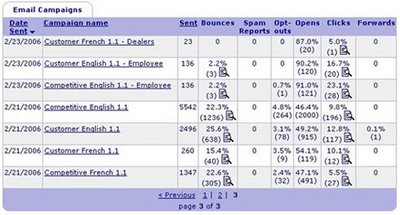
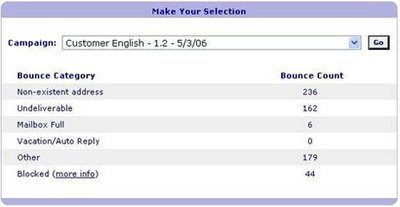
Constantcontact.com is a easy to use web based software for your e-mail marketing needs. It manages subscribers (both unsubscribe and new subscription), bounce-back, lists all wrong e-mail addresses, gives me open rate and also click thru rate for individual articles in my e-newsletter.


See below for an example of the summary statistics generated by constantcontact.com:
Below is an example of bounce-back details provided by constantcontact.com for a particular e-mail campaign:
Is constantcontact.com right for you?

Benefits of using Constantcontact.com:

Subscriber lists:
Constantcontact.com is a very easy to use tool. I can easily divide my subscribers into different groups to send them different versions of my e-newsletter, based on their interests, customer status or geographics area. When new subscribers want to sign up for my e-newsletter, they will be prompt to subscribe to one of the available groups that fits their interests.

Design template:
Constantcontact.com offers many different easy-to-use e-mail marketing template. You can also further customize it to fit your needs. In my case, I have customized a template to abide by my company's branding requirements and to create an unique e-newsletter design.

Pricing:
Pricing of the tool is very reasonable. Be sure to check it out at www.constantcontact.com. I like the fact that I only have to pay a fixed monthly fee based on my list size. You are entitled for discounts if you prepay for 6 months or a year. You can send as many e-mail campaigns as you want with no limitation/ extra costs. For many other e-mail marketing services, they charge you based on the number of e-mail you sent. Although the cost per email will be cheaper if you are sending out more email, the later is harder for me to plan my annual e-mail marketing budget as the cost is not fixed but based on number of e-mail I sent.

IT resources:
Another good thing about using web based service is that you do not need to invest more into your server or IT equipment to accomodate the hardware/bandwidth requirements for sending out huge number of emails at a time. If you purchase an e-mail marketing software and installed it in-house, you might need to subscribe for additional bandwidth for your server, new computer/server and using a specific platform required. Lots of headache there. With a web based service, you do not have to worry about these.

Advanced html editor:
Constantcontact.com is so easy to use and you don't need to be a seasoned html programmer to create a professional e-mail campaign. Of course, it will be beneficial to know a little bit of html. You would need to go to the html advanced editor to edit the following info in your e-mail campaign done in constantcontact.com.

1) If you want to change the "Subscribe now/Join us" heading, text and button, you would need to go to the advanced editor to change the codes there. In my case, I need to change it into French, so I need to go into the advanced editor to modify it.

Limitations in using Constantcontact.com:

Some text cannot be changed:
1) There are 2 lines that cannot be changed, even in the advanced editor. It is a bit inconvenience for me as those lines are in English and I cannot change them into French in my French e-newsletter. I have contacted constantcontact.com and they have told me those 2 lines are hard coded in the software and cannot be altered.
These 2 lines are:
i) "To no longer receive our emails, click to unsubscribe." This line appears in the beginning of your e-mail.
ii) " This email was sent to myemail@email.com, by
yourcompany@email.com." This line appears at the end of your email.

Spam control:
Some ISPs / IT department in different companies have blacklisted anything sent from a constantcontact.com account. Their users have reported too many spam from the constantcontact domain. Although yours might not be a spam, your client requested to have information sent to them. Since the ISP has bloacked the domain, your email will not be received. If you can, ask your customer to submit a non-generic email address (e.g. do not use info@, sales@). These generic email will sometimes be blocked by the e-mail marketing software itself.


Graphics of your e-mail campaign got altered by web based e-mail host:
If your email campaign is targeted to non-business audiences, and the majority of which are using hotmail, gmail, yahoo type of accounts, constantcontact.com might not be an ideal tool to use. I have tried to send e-mail campaign to hotmail and gmail, the layout of my e-newsletter got altered, the graphics are not showing the way it suppose to be.

In my case it is not a big problem as my company is only dealing with business users and most of them do not use a web based e-mail address. However, if yours is a B2C business, you might want to double check if constantcontact.com is an ideal tool for you. Sign up for a free trial, create a test campaign and send to your hotmail/gmail/yahoo (any web based e-mail account) account, you will see if the software will alter your e-mail design layout.

Search Engine Optimization - Meta tags and title

Amongst page title, meta description, meta keywords, page title is the most important. However, the other two shouldn't be ignored also so never forget to put these in your website!

Page Title:

Page title tells the search engine what your page is about. Moreover, the title of your page will appear on the SERP (Search Engine Result Page). Many sites put "Welcome to ABC's company website!". This tells the search engine nothing but your company name and definitely not beneficial to the searchability of your site. Since the text in the beginning are always the most important, if you really need to put your company name in the page title, please try to put it at the end. I would avoid words like "ABC company homepage" or "Welcome" but put in important and relevant keywords (should also appear in your body text of your page) that you page is about.

Put as much keywords (don't repeat keywords too much, as search engine will discard your keywords if they appear too often) as you can in your page title. Make sure these keywords are highly relevant to your website's content. One thing to keep in mind, don't exceed 65 characters for your page title. This is a maximum limit most search engine can truncate to.

Meta Description:

Although less search engines are utilizing the meta description on the SERP, some are still showing the meta description under the title in the SERP and that's why you should not be missing the meta description in your webpages. You can control what is the description of your site to be shown to the web surfers by using a meta description (for those search engines which are still utilizing the information) . Remember to place the important keywords together at the beginning of your meta description.

Nowadays, most serach engine uses the 200 characters appear near the keyword in your web page in the Snippet (The description of your site show to the web surfer on the SERP under your page title). Yahoo still utilizes the Meta description. Please do keep in mind, Google's snippet is shorter, around 100-150 characters long. Whereas Yahoo allows longer snippet with 150-200 characters. However, to design one that fits all, be precise and keep your meta description/ important idea around your keyword in your body text at around 150 characters.

Meta Keywords:

Many search engines are no longer utilizing the meta keyword tag, but yes, a few still do. When you put in the keyword tag, do not put in more than 20 keywords or key phrases separated by a comma. Make sure these keywords are relevant and descriptive of what your site is talking about.

Saturday, August 26, 2006

Ok, I got the traffic, what's next?

In my opinion, in order for you to get leads from your website, you need 2 things:

1) Traffic
2) Compelling content

Yes, you have done all you can to improve your web site's searchability, buying paid inclusion ad to generate tons of traffic to your website. If you do not have content, people will still leave your site in no time and you still have no new customer, no conversion.

You need compelling content to keep people on your site, to look for information, and hopefully they will request more info from you, sign up for your e-newsletter or to make a purchase on your e-commerce site.
Avoid wasting the traffic generated, before doing SEO or paid inclusion and improving your site's organic searchability, you should better your site content first. (Once searchers found that your site has nothing interested them, they will not click on your site later on even you have updated your content!)

Put aside e-commerce here (I will talk about it in another post), by saying compelling content, I mean the followings:

1) Professional attractive web layout - clean and consistent layout, not too busy, easy to read- attractive graphics- easy navigation- simple and easy to use user interface - good site ergonomics
2) Create positive client experience - with multimedia, full of useful features, easy to use
3) Relevant content - Imagine yourself go to a website after clicking on a sponsor link or a result on SERP but found no relevant content when you get there, will you leave the site immediately?
4) Just-enough information - short and precise. Depends on the industry and products (especially for expensive business products which usually requires longer decision process), sometimes too much details on the website is no good. People will be overwhelm by the info and get frustrated as they cannot comprehend. Provide just-enough information to generate interest in your products and to encourage people to contact you for more information. (However, for e-commerce site, you need to put enough info there so people knows the product enough to be confident to purchase from you.)
5) Quick loading - If your site takes forever to load, who has the patience to wait and browse?

Using web analytics tool, like WebTrends (I use WebTrends before and now using SurfStatsLive for my company's site and the Free Statcounter for this blog), keep track of on average, how many pages a visitor visits (Total # of page viewed/ Total # of visits). You can know how "sticky" your site is and can make plan to improve your site (or keep on doing what is working).

Yes, always need to improve the stickiness of your page. You want your visitors to stay on your page longer to look for info and at the end to convert them into a customer.